Agent SDK to Agent Server: crossing the service boundary
An agent can be many thing: ephemeral or long-lived, stateful or stateless, automating processes behind-the-scene or user-facing.
How do these behavioural features map with technical capabilities provided by the agent frameworks? And the other way around, OpenCode has a server-client architecture while other frameworks are libraries: how does that matter when you want to build an agent
In this part, I'm looking at how agent behaviours and agent implementation details are related. In particular what technical layers need to be implemented to go from an Agent SDK to an Agent Server (OpenCode).
What's an Agent "SDK" anyway?
Libraries and services
Think of the difference between Excel and Google Sheets.
An Excel spreadsheet lives on your machine. Nobody else can see it while you're working. It exists on your machine and only your machine.
Google Sheets lives on Google's servers. You open it in a browser, but the spreadsheet is not on your machine. You can close your browser and it's still there. You can open it from your phone, from another laptop. It keeps running whether or not you're connected.
Excel behaves in this example like a library, it's embedded. Google Sheets is "hosted": it lives behind the service boundary. It's a service.
The lifecycle of a service is not bound to the lifecycle of the client that is calling it. The service boundary is not just about separate physical machines — it is about whether a capability runs inside an application or as a separate, independent process. An application calls a library directly; it connects to a service over a protocol.
A more technical example: databases.
SQLite is embedded. Your application links the library, calls functions directly. No service boundary. When your app exits, SQLite exits.
PostgreSQL is hosted. It runs as a separate server process. Your application connects over a socket, sends SQL as messages, receives results. Service boundary. PostgreSQL keeps running after your app disconnects.
What is the difference between an Agent SDK and a regular coding agent?
What's the difference between Claude Agent SDK and Claude Code, between Codex SDK and Codex, between Pi coding agent and Pi SDK?
An Agent SDK provides the same kind of capabilities you would expect from a coding agent — but as a "programmable interface" (API) instead of a user interface
- Send a prompt, get a response — the equivalent of typing a message in Claude Code. In the SDK:
query(prompt). - Resume a previous conversation — pick up where you left off, with full context. In the SDK: pass a
sessionId. - Control which tools the agent can use — restrict it to read-only, or give it full access. In the SDK:
allowedTools. - Intercept the agent's behavior — get notified before or after a tool call, log actions, add approval gates. In the SDK: hooks.
# Send a prompt to the Claude Agent SDK with a list of allowed tools
from claude_agent_sdk import query

async for message in query(
    prompt="Run the test suite and fix any failures",
    options={"allowed_tools": ["Bash", "Read", "Edit"]}
):
    print(message)
With an Agent SDK, you may:
- Automate tasks
- Extend an existing app with agentic features
Example: automated code review in CI.
- You run the Claude Agent SDK in a GitHub Actions job.
- When a PR is opened, the agent reviews the code, runs tests, and posts comments.
- There is no service boundary: the agent is instantiated within the GitHub Actions runner process, and is constrained by that runner's limits — 6-hour max job duration, fixed RAM and disk, no persistent state between runs.
Example: agentic search in a support app.
- A customer support app adds an agentic search capability to help users refine their query and find the information they need.
- The support app user chats with the agent that searches, filters and combine information from the knowledge base, ticket history,... The user can turn its search into a support ticket answer or any other relevant action.
- The agent is a function call within the app process. When the search completes (or the user navigates away), the session is gone. No agent service boundary.
In both cases, the agent runs within the host process. It starts, does its work, and stops. No independent lifecycle. No reconnection. No background continuation.
How is an Agent Server different from an Agent SDK?
The Agent Server use case
If you want to build a ChatGPT clone, an Agent SDK is a start. But it's not enough.
You need the agent's lifecycle to be decoupled from the client's so that you can:
- Access from anywhere, not just a CI job or a bot on your server.
- Close your browser, come back later, and find the agent still running — or finished.
- Connect multiple people to the same agent session.
- Get real-time progress as the agent works.
You cannot just put the SDK on a server and call it done. The SDK gives you the agent loop. It does not handle what comes with running a process that other people connect to over a network:
- Authentication — who is allowed to talk to this agent, and how do you verify that?
- Network resilience — clients disconnect, requests timeout, connections drop mid-stream. The library assumes a stable in-process caller.
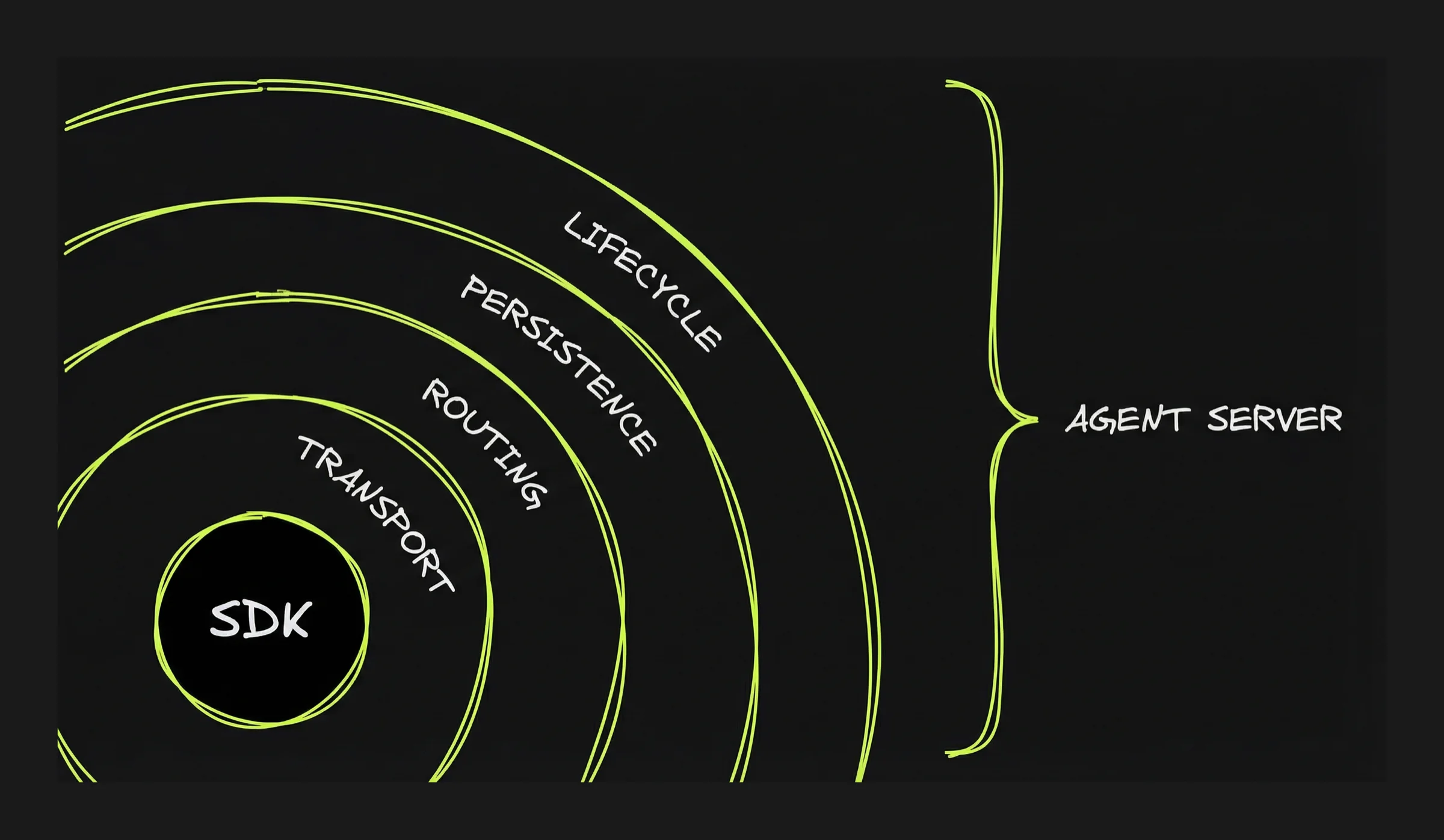
Agent-specific server capabilities
Authentication and network resilience need to be thought through for any client-server application. Agents require additional layers:
Transport: how the user's browser (or app) talks to the agent server. You build an HTTP server that accepts requests and returns agent output. The question is how much real-time interaction you need. There are multiple options of growing complexity from standard HTTP request/response (the user submits a task and waits for the complete result: no progress updates while the agent works) to Websocket. See focus on the Transport layer in Part 5 for more details.
Routing: how each message reaches the right conversation. You build this by assigning a session ID to each conversation and maintaining a registry — a lookup table that maps session IDs to agent processes. When a message comes in, the server looks up the session ID and forwards the message to the right place.
Persistence: how conversations can be accessed and resumed later. You build this by "persisting" the conversation state (messages, context, artifacts). Unless the runtime is run without interruption that means saving the state and reloading it when the user reconnects. Part 5 shows how different projects solve this differently.
Lifecycle: what happens when the user closes the tab while the agent is working. When the agent runs inside the request handler, when the user disconnects, the connection closes and the agent stops. For longer tasks, you need the agent to survive disconnection. To do so, first you need to separate the agent process from the request handler. The agent runs in its own container or background process, not inside the HTTP handler.
OpenCode: the only Agent Server
OpenCode ships as a server with most layers built in.
| Layer | OpenCode provides | What it does not provide |
|---|---|---|
| Transport | HTTP API + SSE streaming. Client sends prompts via POST, receives output via SSE. | No WebSocket. SSE is one-way — the client cannot send messages while the agent is streaming without making a separate HTTP request. |
| Routing | Full session management — create, list, fork, delete conversations. Each session has an ID. | Sessions are scoped to one machine. No global registry for routing across multiple servers or sandboxes. |
| Persistence | Sessions, messages, and artifacts saved to disk as JSON files. Restart the server and conversations are still there. | Persistence is tied to the local filesystem. If the machine or sandbox is destroyed, the files are gone. No external database, no durable state across environments. |
| Lifecycle | Server continues running when client disconnects. Agent keeps processing. Reconnect with opencode attach. |
No recovery from server crashes — in-flight work is lost. No job queue, no supervisor, no automatic restart. |
| Multi-client | Multiple SSE clients can watch the same session simultaneously. | Only one client can prompt at a time (busy lock). No presence awareness, no real-time sync between clients. Multiple viewers, single driver. |
| Authentication | Optional HTTP Basic Auth. | No tokens, no user identity, no multi-tenant isolation, no fine-grained permissions. |
What to keep in mind
- An Agent SDK is a library. An Agent Server is a service. The SDK runs inside your process — when it stops, the agent stops. A server runs independently — the agent survives disconnection.
- Crossing the service boundary means building four layers: transport (how the client talks to the server), routing (how messages reach the right session), persistence (how state survives restarts), lifecycle (how the agent runs without a client connected).
- OpenCode is the only agent SDK that ships as a server. It provides all four layers out of the box, scoped to a single machine. For global routing, multi-tenant access, or cloud deployment, you build the remaining pieces yourself.